A Practical Workflow for Turning Video into Subtitles
If your end goal is subtitles, treat transcript text as the first layer, not the finished artifact. Here is the practical sequence that keeps the work clean.
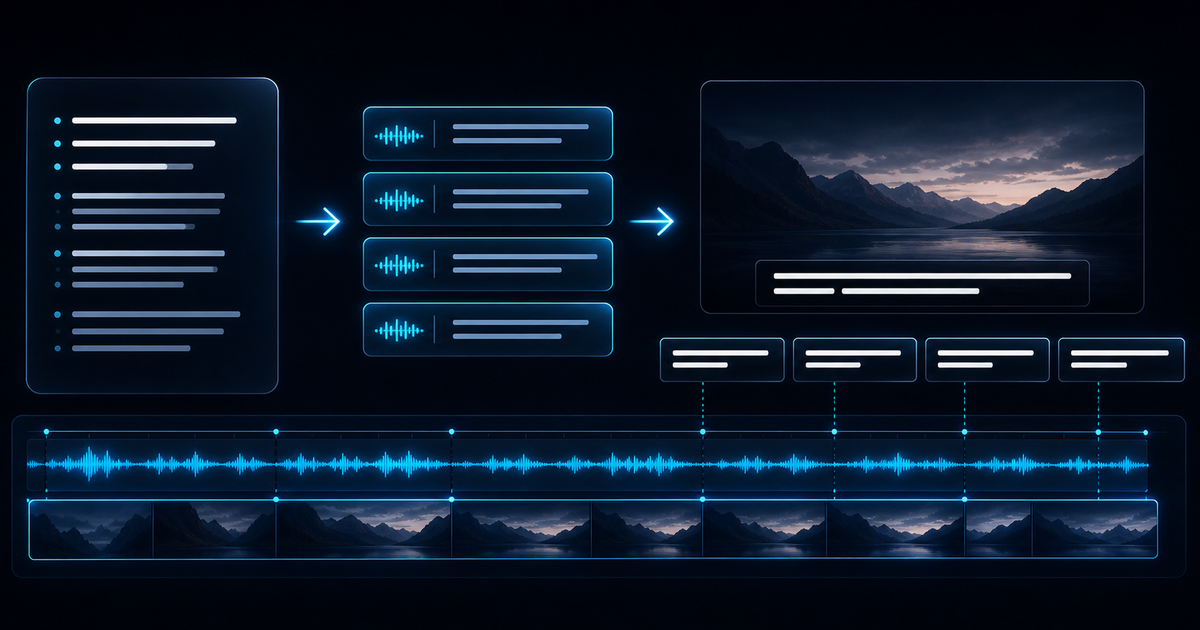
People often say they want subtitles when what they really want is a faster way to get words out of a recording.
That distinction matters.
Step 1: Start with transcript text
The transcript is your raw language layer. It lets you:
- review what was actually said
- fix names and terminology
- remove obvious recognition errors
- break long text into readable phrases
Without this step, subtitle editing becomes slower and messier.
Step 2: Clean for readability, not verbatim purity
Subtitles rarely benefit from perfect verbatim output. They benefit from readable chunks.
That usually means:
- trimming filler words
- splitting run-on sentences
- removing repeated false starts
- shortening dense phrases
Step 3: Confirm timing support before subtitle export
Reliable subtitle files need segment-level timing in addition to transcript text. If your source only contains plain text, add and review timing in a subtitle editor.
Wave2Text exports TXT transcripts and does not currently export SRT or VTT subtitle files.
Step 4: Decide the subtitle standard you need
There is a big difference between:
- internal review captions
- social media captions
- platform-ready subtitle files
- broadcast-grade subtitles
Do not build for the heaviest case if you only need the lighter one.
A better mental model
Think of subtitle work as a stack:
- speech to text
- text cleanup
- timing
- formatting
- final QA
Treating each layer separately makes the final subtitles easier to review and correct.